Forgeplane organizations, teams, and projects
Forgeplane separates membership, ownership, and deployment scope. The hierarchy is:
Organization → Team → Project → Environment → Instance
These are first-class authorization and resource boundaries, not labels added to a run. Use the narrowest boundary that matches the people, infrastructure domain, and deployment policy you need to operate.
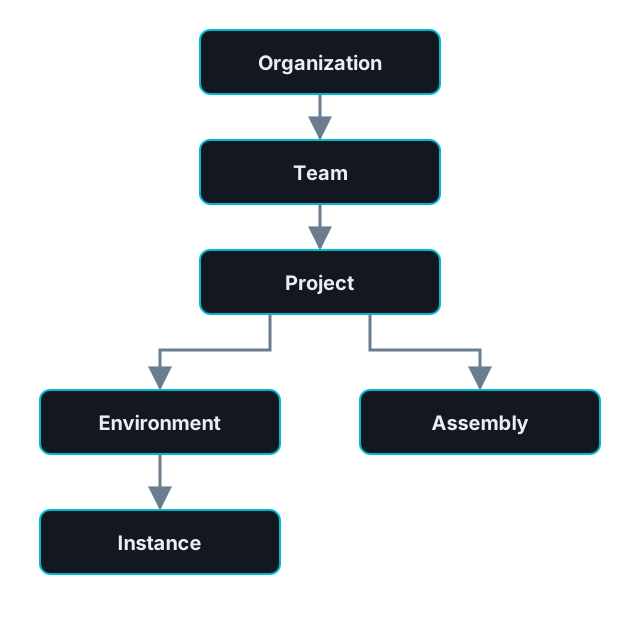
Registry templates are reusable definitions. Instances bind templates to environments, while separately versioned assemblies coordinate published template versions at the project level.
Organization
Section titled “Organization”An organization is the top-level membership boundary. It commonly represents a company or an independently administered business unit. Organization membership limits which teams and resources a user can discover.
Organization owners manage organization metadata and membership. A system administrator can operate the installation, but a system role alone is not ordinary membership in every organization.
Owners and organization administrators can manage members and invitations within their organization. Forgeplane checks the current user, target member, organization, and invitation state when it applies each change, so an earlier access check does not guarantee that a later change will succeed.
Only a current organization owner can transfer ownership; a system administrator has no override. A transfer must name a current organization member, and Forgeplane keeps the organization with exactly one current owner throughout the change. Member removal and role changes cannot leave the organization without an owner.
A team groups people inside one organization and owns projects. Team roles govern team-scoped actions such as metadata, membership, invitations, ownership, and deletion.
Team roles and system permissions are evaluated together. A team role does not grant installation-wide administration, and a broad system role does not erase project or organization scope checks.
Project
Section titled “Project”A project is the main ownership boundary for an infrastructure domain or service. It belongs to one team and scopes:
- environments and instances;
- assemblies;
- connections and secret-catalog entries; and
- webhooks and automation identities associated with the project.
Templates live in the registry and can be selected by project resources; they are not child template records inside the project.
Saving and retrying workload forms
Section titled “Saving and retrying workload forms”Project create/edit forms save the fields and submitted feature gates together, or save nothing. Environment create/edit forms also save atomically. Initial Project gate assignments depend on your permission to update the new Project; see Feature gates.
A confirmed rejection leaves the previous state unchanged. Review the feedback, correct the form, and submit again. A lost response or an unconfirmed save is different: the change may already have committed.
Use the form’s current-state link before another submission. With JavaScript, the form retains your inputs and blocks another save until you explicitly confirm checking the current state. That confirmation only unlocks the form; it does not submit it. Without JavaScript, check the list or resource page before retrying after a browser or network failure. Forgeplane does not automatically retry or guarantee exactly-once submission.
Deleting core parents
Section titled “Deleting core parents”Project, Environment and Team delete dialogs use a separate original-command outcome flow, not the create/edit form’s current-state confirmation. After submission, the delete action stays locked. A lost response may follow an already completed deletion, so the dialog offers Check deletion outcome, a read-only lookup of the original command. A pending or rejected operation never becomes a completed result merely because its resource cannot be found.
A recorded committed receipt offers Continue. If no completed receipt is observed, that is not rollback proof: deletion remains unconfirmed and the dialog does not submit again. Keep that page open; the browser retains the command key only in page memory, not across navigation or reload.
Permitted core parent deletion atomically tombstones registered plugin descendants while retaining their plugin SQL data and original historical attribution. It does not bypass existing dependency checks. A missing original parent prevents plugin resource restoration; restoring registry identity never recreates the parent or activates plugin code. See the API retry and outcome contract for machine clients and the required deletion-key cutover.
Environment and instance scope
Section titled “Environment and instance scope”An environment belongs to a project and groups instances under a deployment context such as development, staging, or production. It carries shared variables and feature-gate resolution inputs.
Use separate environments where approval, drift, credential, or deployment boundaries need to differ. An instance then binds one published template lineage to one environment and becomes the stable identity for runs, drift findings, and managed state.
See Environments and Instances for execution and policy behavior.
Authorization layers
Section titled “Authorization layers”Forgeplane evaluates system permissions, organization membership, and team-scoped actions together. Use Permissions and roles as the current authorization source of truth instead of copying a role matrix into automation.