Self-hosted infrastructure orchestration
Forgeplane is a self-hosted infrastructure orchestration control plane for governed Terraform, OpenTofu, and Ansible delivery. It turns versioned infrastructure code into typed, reviewable runs while keeping execution inside worker pools that you operate.
Try a governed run
Section titled “Try a governed run”Explore a Terraform/OpenTofu plan-to-apply workflow without beta access. Create an apply request, play the reviewer, and follow either approval or rejection. This simulation starts with a successful plan; publishing templates and creating instances happen before it.
All data, identities, logs, and results are simulated. Nothing connects to Forgeplane or changes infrastructure. This illustrates the workflow, not the exact product UI.
- Review plan
- Approval
- Execution
- Evidence
service-config / production
OpenTofu · published template v1.0.0 · approval required
demo-plansucceededArtifact: demo-plan.bindemo-applyNot createdApproval record: Not requestedReview the proposed change
The sample plan updates a terraform_data input. Review the impact before creating an apply request.
0 add 1 change 0 destroy
~ terraform_data.service_config
input.replicas: 2 → 3A different reviewer decides
Promotion created demo-apply and the separate demo-approval record. The source plan is still succeeded.
Requester: Maya · Authorized reviewer: Theo
Simulated identities; you play both roles in this demo.
Approved does not mean applied
The decision is approved, but demo-apply is only queued. It must wait for an eligible, OpenTofu-capable worker.
tofu · availableApply the reviewed artifact
The simulated worker uses demo-plan.bin, not a newly generated plan. In Forgeplane, an artifact digest mismatch fails closed.
[demo] Claimed demo-apply
[demo] Source artifact: demo-plan.bin
[demo] SHA-256 digest check: match (simulated)
[demo] Applying reviewed plan…Follow the evidence chain
The simulated apply succeeded. The approval record is now applied; the original plan remains an independent successful run.
- Source plan
demo-plan· succeeded- Approval record
demo-approval· Maya → Theo- Linked apply
demo-apply· succeeded- Reviewed artifact
demo-plan.bin· simulated digest match- Approval reason
[demo] Apply complete: 0 added, 1 changed, 0 destroyed.Rejected. Nothing is queued.
The approval record is rejected. The apply intent never enters the queue, and the source plan remains succeeded.
In a real workflow, revise the inputs or definition, generate new plan evidence, and submit a new promotion when appropriate. Restart this demo to explore approval instead.
A successful plan is ready for review. No apply request exists yet.
Platform model
Section titled “Platform model”Forgeplane uses explicit ownership and execution boundaries:
- An organization is the top-level membership boundary.
- A team owns one or more projects.
- A project scopes environments, assemblies, connections, secrets, and automation identities.
- An environment groups deployment targets and policy controls.
- A registry template versions infrastructure source, its input contract, and execution metadata.
- An instance binds one template to one environment.
- A run records one requested operation, its resolved inputs, approval state, logs, and result.
- An assembly is a separately versioned DAG that coordinates published template versions.
Terraform and OpenTofu instances can use managed state, drift monitoring, and the full preview/apply/teardown lifecycle. Ansible templates use the same governed queue and log stream, but are execute-only: they do not use Terraform-style plan/apply promotion, teardown, or drift workflows.
How a run moves through Forgeplane
Section titled “How a run moves through Forgeplane”A typical Terraform or OpenTofu delivery follows this path:
- Register a template and publish a version with its tool and input contract.
- Create an environment and an instance bound to that published version.
- Resolve environment defaults, explicit inputs, connections, secret bindings, worker requirements, and policy at run creation.
- Queue a
planrun on a worker pool that advertises the required capability. - Review the plan artifact. When policy requires approval, an authorized reviewer approves or rejects a separate apply intent.
- Apply the exact promoted plan artifact, then retain the run status, logs, output, and audit records.
Ansible follows the shared admission and worker-execution boundary through an execute run, but it does not use plan/apply promotion. Ansible v1 passes typed template inputs, inventory, catalog-backed credentials, and optional structured outputs to a version-matched worker. Run Ansible playbooks with Forgeplane documents the execution contract and its retry boundaries. Run operations describes the shared lifecycle.
Runtime
Section titled “Runtime”The platform has two runtime roles:
- The coordinator serves the UI and REST API, stores platform state, resolves policy, and schedules work.
- Workers fetch signed execution bundles, run an advertised tool capability, and stream status and logs to the coordinator over gRPC.
The coordinator uses PostgreSQL for durable records and NATS JetStream for work delivery. Named worker pools route runs to workers with the required network placement and toolchain.
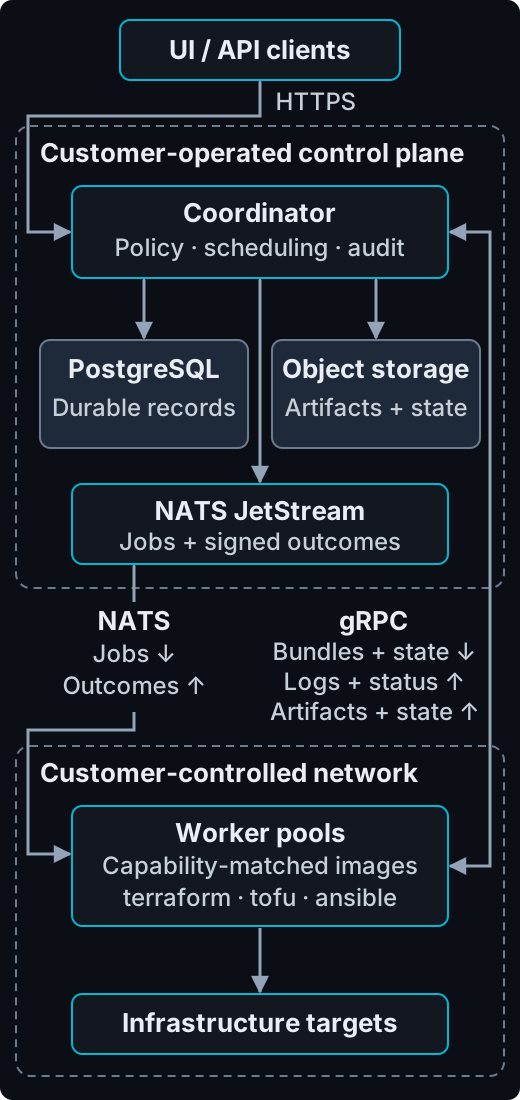
The boxes show placement, not automatic isolation. Enforce worker network boundaries with network policy and credentials; see Run Terraform and OpenTofu in private networks.
The base production worker image does not bundle infrastructure tools. Use the version-matched Forgeplane Ansible worker image for Ansible v1. Build or select an explicitly tool-capable image for Terraform, OpenTofu, or any additional Ansible collections and runtime packages that your templates require. The repository’s local profiles include opt-in OpenTofu and Ansible workers for evaluation.
Fit and boundaries
Section titled “Fit and boundaries”Forgeplane is a fit when you need a self-hosted control plane for versioned infrastructure delivery, worker placement, approval gates, audit evidence, and controlled operations.
Before using it for production delivery, account for these boundaries:
- You operate the coordinator dependencies, artifact storage, managed-state storage, and encryption keys.
- The default production worker image cannot execute Terraform, OpenTofu, or Ansible until you provide the matching tool-capable image.
- Ansible is execute-only and does not inherit Terraform/OpenTofu plan, apply, teardown, or drift behavior.
- Selective Undo is a private-beta, disabled-by-default workflow for proposing one evidence-backed historical input removal. It creates a normal governed change; it is not an instant rollback.
Deployment
Section titled “Deployment”Private-beta releases are delivered as signed container images and a Helm chart for Kubernetes. The coordinator, database, message bus, artifact storage, managed-state storage, and encryption keys remain within infrastructure you control.
See Container distribution and Helm chart for deployment contracts.
Next steps
Section titled “Next steps”Follow the Quickstart to configure a first run. Read Self-hosted Terraform and OpenTofu orchestration for product fit, then review Workers, Environments, Managed state, and Assemblies before designing a production topology.